Smartphone-Assisted Virtual Reality

Photo by Lux Interaction on Unsplash
To conclude my bachelor in computer science, I wrote my thesis about using a Smartphone as an interaction device for Virtual Reality. This article is basically a summary of my thesis as a blog. Enjoy!
Introduction
Virtual Reality is an emerging medium that enables presence and interactivity in a three-dimensional space. Conventional input devices like a mouse or a keyboard are made for two-dimensional environments. They require complex movements to complete tasks in a three-dimensional environment.
VR controllers by L. Yang on Steam Community
This is why a variety of different input devices, specially made for Virtual Reality, exist. But most of them are expensive and need complex tracking systems.
Most people already own a smartphone that they use on a daily basis. Such phones have a variety of different sensors already built-in, feature wireless capabilities, and are able to run custom software. This makes them affordable general-purpose devices.
Experiments
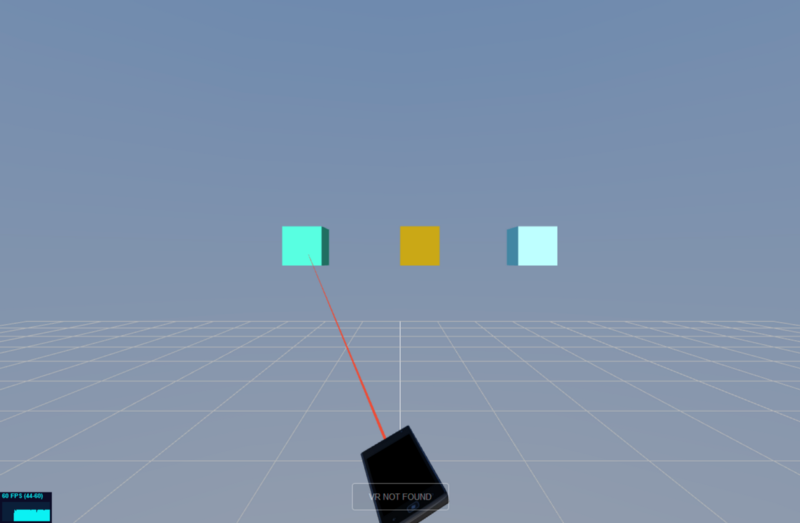
Screenshot of the laser pointer experiment
Three experiments were implemented to demonstrate how the smartphone can help with common interactions when using Virtual Reality applications:
Model Viewer: An application to view and rotate three-dimensional models. The rotation of the 3D model displayed in VR is synchronized with the Smartphone. To rotate the model, the phone has to be rotated in the wanted direction.
Laser Pointer: A method to select objects or UI elements. A virtual representation of the Smartphone is shown in VR. The rotation is again synced with the real Smartphone. Out of the front of the phone comes a red line (the “laser”) which is used to point at user interface (UI) elements.
Virtual Keyboard: An application to write text on a virtual keyboard. The virtual keyboard is shown in VR. The buttons on it are mapped to the Smartphones’s touch screen. A blue circle is used to see where the location, touched on the display, maps to the keyboard in VR.
Implementation
To get platform independence, I decided to use a web-based stack. All experiments were implemented in WebVR using Three.js and Javascript.
The networking framework Ubi-Interact, developed at my university, is used to make the proposed experiments reusable and abstracted from device-specific environments. It connects the PC, running the VR experience, and the Smartphone together. Most of the experiment-specific interaction logic is abstracted into so-called “Ubii Interactions”, which run on a server.
The client running on the Smartphone was also developed using Javascript.
Evaluation
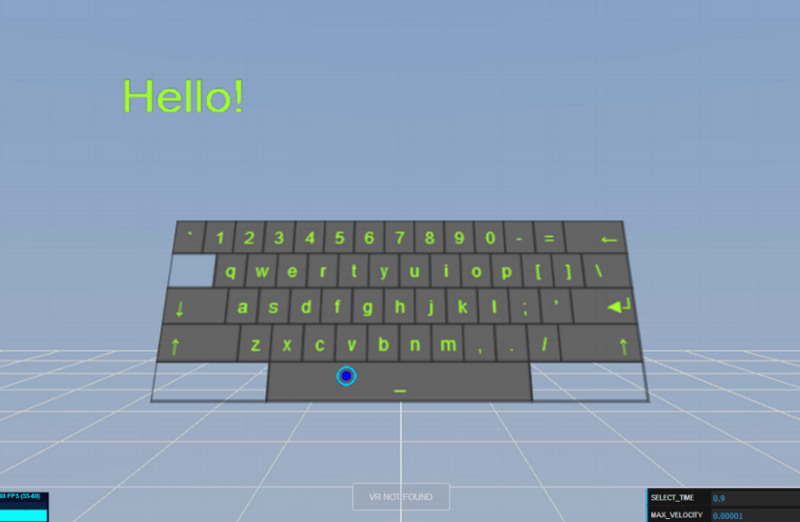
Screenshot of the virtual keyboard experiment
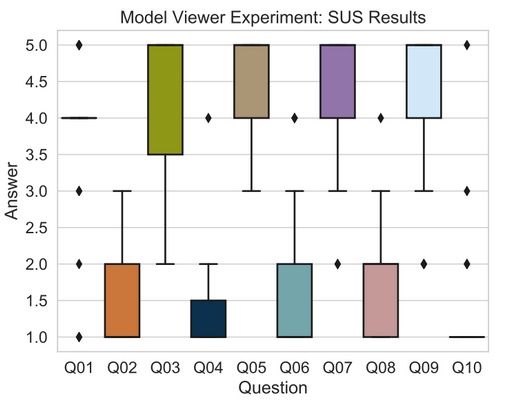
In order to test the usability of the smartphone as an assistant device for VR, a user study was conducted. In the study, participants had to complete tasks with the three experiments. Also, a System Usability Scale (SUS) user study was performed to get feedback from the users.
A SUS questionnaire asks the participants to rate the following statements regarding the usability of a system from one to five:
- I think that I would like to use this system frequently.
- I found the system unnecessarily complex.
- I thought the system was easy to use.
- I think that I would need the support of a technical person to be able to use this system.
- I found the various functions in this system were well integrated.
- I thought there was too much inconsistency in this system.
- I would imagine that most people would learn to use this system very quickly.
- I found the system very cumbersome to use.
- I felt very confident using the system.
- I needed to learn a lot of things before I could get going with this system.
To sum up:
Model Viewer: Most participants agreed that this input method is very intuitive and effective to operate.
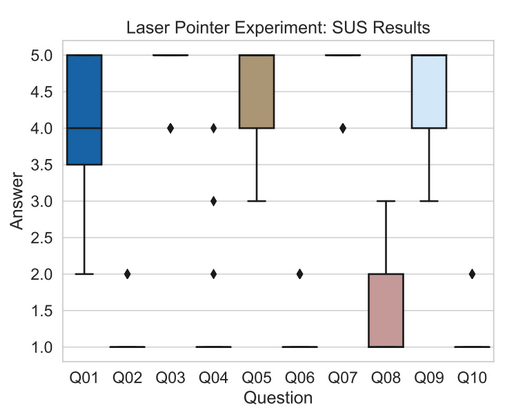
Laser Pointer: This experiment scored the highest amongst the ones presented in this research.
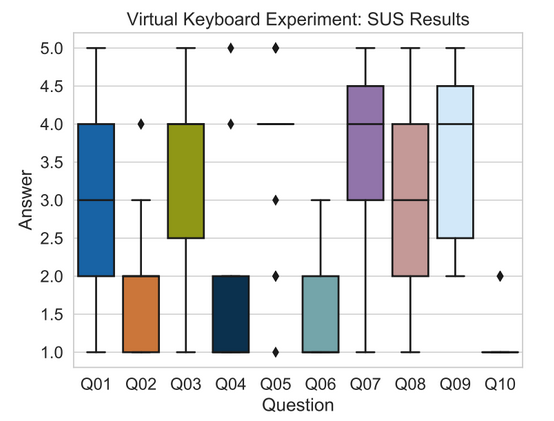
Virtual Keyboard: While the model viewer and the laser pointer scenario reached a very high score, the virtual keyboard scored slightly lower but still demonstrates high usability despite its complexity.
Conclusion
A lot of feedback was collected during the user study, which can be used to improve these implementations further. Since all experiments are considered “acceptable” according to the System Usability Scale, the Smartphone can indeed be considered a working input device for Virtual Reality.
If you want to read the full thesis, check out this link.
About the author
Passionate about software development and architecture, web and cloud technologies, as well as game development.
Comments
Join the discussionNo comments yet. Be the first to comment.